Feature extraction, DFM checks, and a first-pass quote from a STEP file, in Python
- Role
- Sole developer
- Year
- 2026
- Tools
- Python 3.12CadQueryOpenCascade (OCP)Playwright
- Processes
- 3-axis milling
Overview
A Python tool that reads a STEP file with OpenCascade, recognizes holes, pockets, and slots, runs DFM rules, and prices the part at four quantities.
Problem
Quoting a milled part starts with someone reading the model by eye, and that read is slow, inconsistent, and never written down.
Every request for quote asks the same questions: how big is the stock, how many setups, how many holes and what sizes, and what in the part is going to fight the machinist. Answering them from a STEP file by hand takes ten to twenty minutes per part, the answers depend on who is looking, and nothing is recorded. When the same part comes back a year later, the read happens again.
Constraints: the tool had to work from the STEP file alone, with no feature tree and no drawing, because that is what a shop receives. It had to run in seconds on a laptop without a CAD seat, and it had to show its arithmetic, so a quoter can disagree with one line without throwing out the rest.
Approach
Read the boundary representation the way a machinist reads the part: every face is stock, a hole, a recess, or an edge break.
OpenCascade, through CadQuery, loads the STEP file and hands over the faces. For each one the tool records the surface type, the outward normal, and for cylinders and cones the axis and radius, then builds the face adjacency from shared edges. Whether a cylinder is a hole or a boss is a question of which side the material is on, so the tool compares the outward normal with the radial direction from the axis:
def _is_concave(info: FaceInfo) -> bool:
    """Material outside the surface: the outward normal points toward the axis."""
    foot = point_on_line(info.point, info.axis_point, info.axis_dir)
    radial = sub(info.point, foot)
    return dot(unit(radial), info.normal) < 0
Holes are concave cylinders, grouped across the seam that STEP writers use to split a full cylinder into two faces. A point probed just past each end of the group says whether that end is open or closed, which decides through versus blind and which face the drill enters from. A larger coaxial group that starts at the entry is a counterbore; a concave cone there is a countersink. Diameters are matched against tap-drill, clearance, and reamer tables so the report says “M8 tap drill” instead of “6.8 mm”.
Pockets start from planar faces that are recessed along one of the six principal directions and reachable from it. The reachability test samples a line from the floor out to the stock boundary and rejects any floor that has material above it, which is what stops every pocket wall from being counted as a floor seen from the side. The floor’s neighbours are its walls: walls whose normals point inward enclose the pocket, and any wall that points away means the pocket is open on that side. The smallest concave vertical cylinder in the rim is the corner radius, and two flat walls that share a vertical edge are a sharp corner that no rotating tool can cut. Two half-rounds joined by flat walls and open at both ends are a through slot. Chamfers and fillets are what is left.
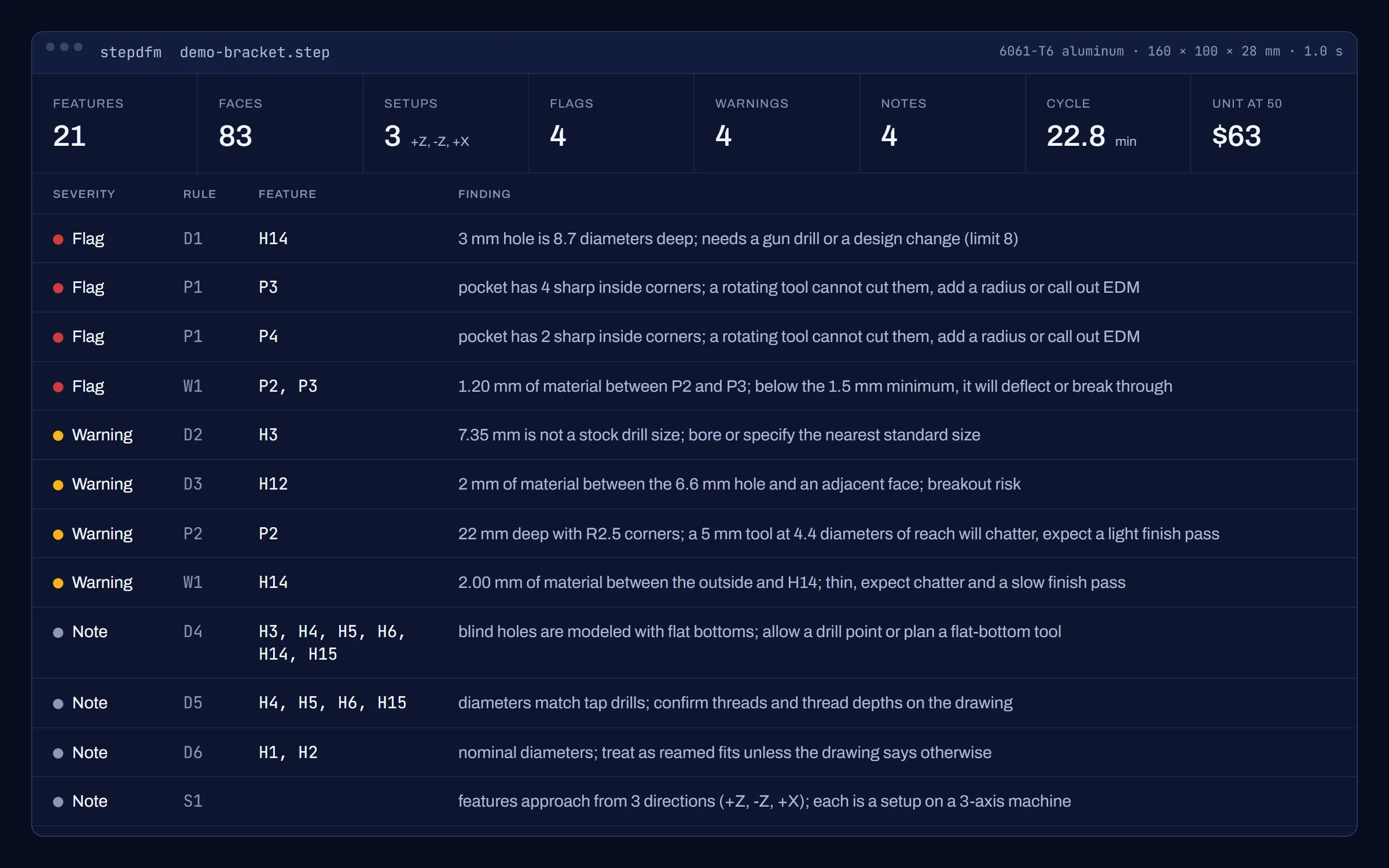
The rules are plain statements with thresholds in one dictionary: depth over diameter, depth over corner-tool diameter, wall thickness between any two faces that look away from each other, material between a hole and an edge, non-standard diameters, extra setups. Each finding carries a severity. A flag means the part cannot be made as drawn without a special process or a design change. A warning is a cost driver. A note is something the quoter needs to know.
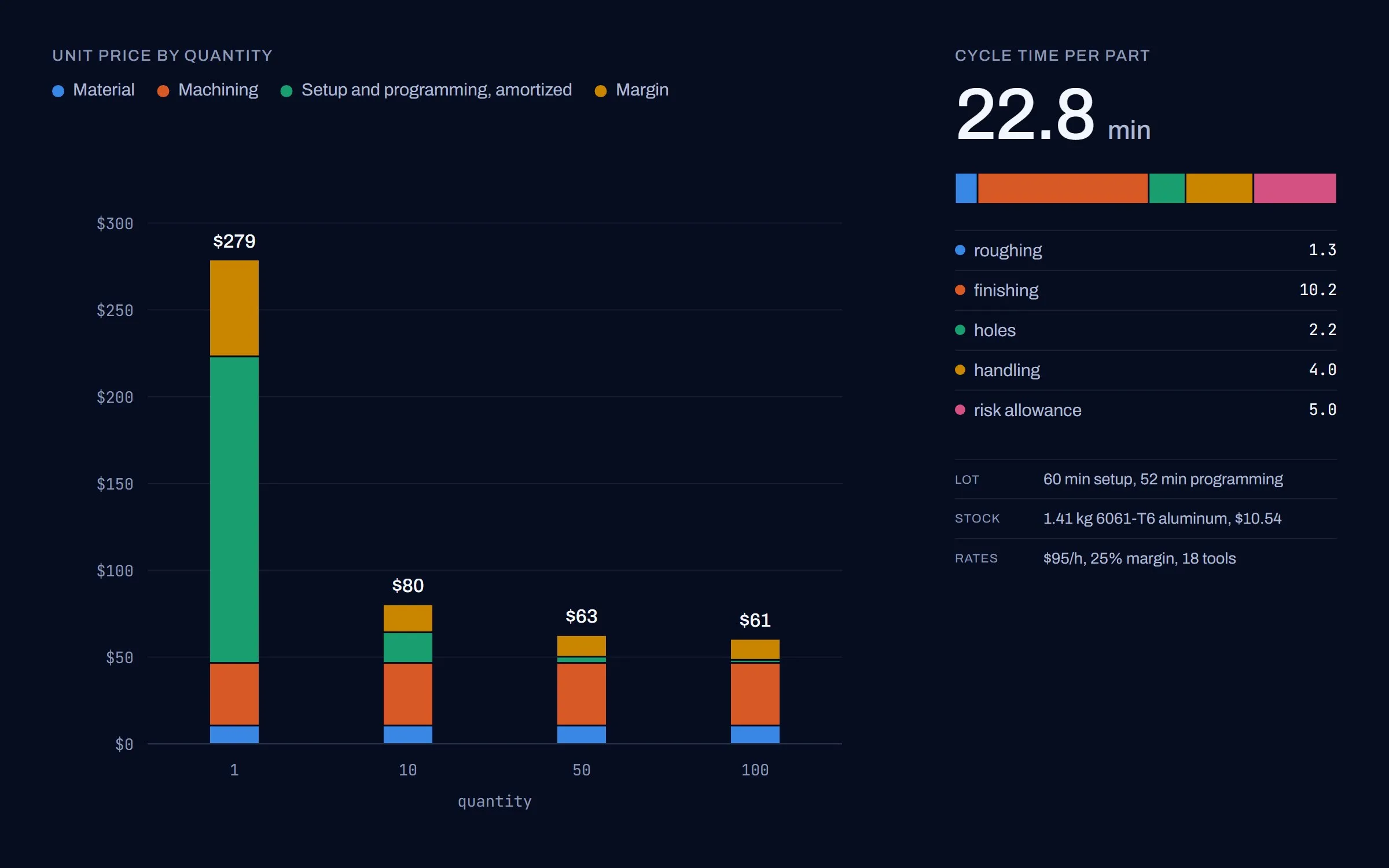
The estimator is deliberately simple and completely visible. Roughing time is the volume removed over a material removal rate, finishing is machined surface over a finishing rate, hole time comes from spindle speed and feed per revolution by diameter, handling is setups and tool changes, and each warning or flag adds a few percent of risk. Setup and programming are a lot cost spread over the quantity. Every rate lives in one table and the report prints the breakdown, so the numbers can be argued with line by line.
Rejected alternatives: reading the feature tree from Inventor, which ties the tool to one CAD seat and to however the modeler happened to build the part, when the boundary representation is what actually arrives in the inbox; and a learned classifier, which would need labeled parts the shop does not have and could not explain why it flagged a corner.
Interactive model
Drag to rotate. Scroll or pinch to zoom.
The model could not be loaded.
Drag to rotate. Scroll or pinch to zoom.
The model could not be loaded.
Outcome
| Metric | Result |
|---|---|
| Features recognized on the demo part | 21 of 21 |
| Findings on the demo part | 4 flags, 4 warnings, 4 notes |
| Run time for 83 faces | 1.0 s |
| Python | ~1,400 lines in six modules |
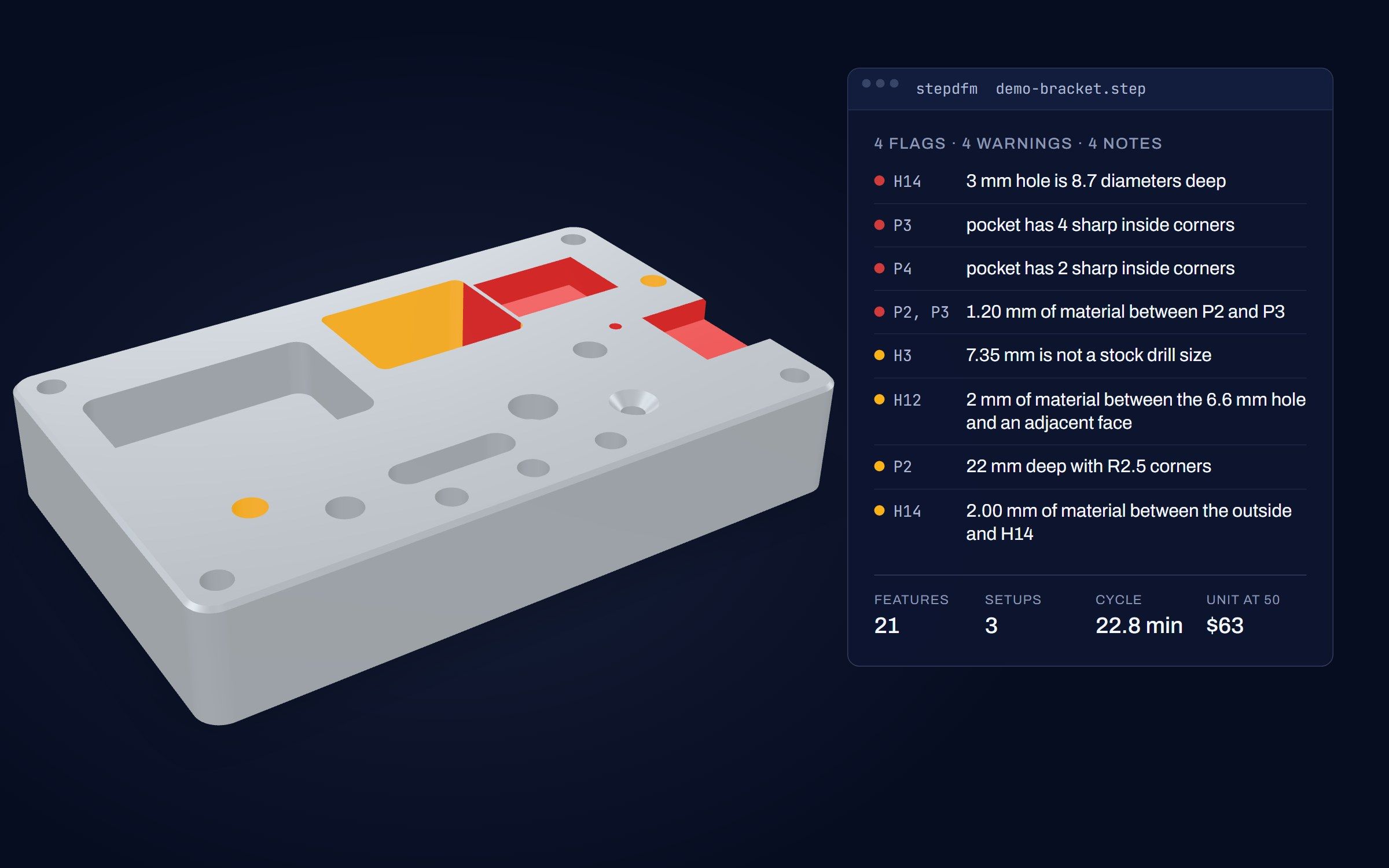
On the demo part the tool finds all 21 features, flags the four things a machinist would flag, and prices the part in about a second.
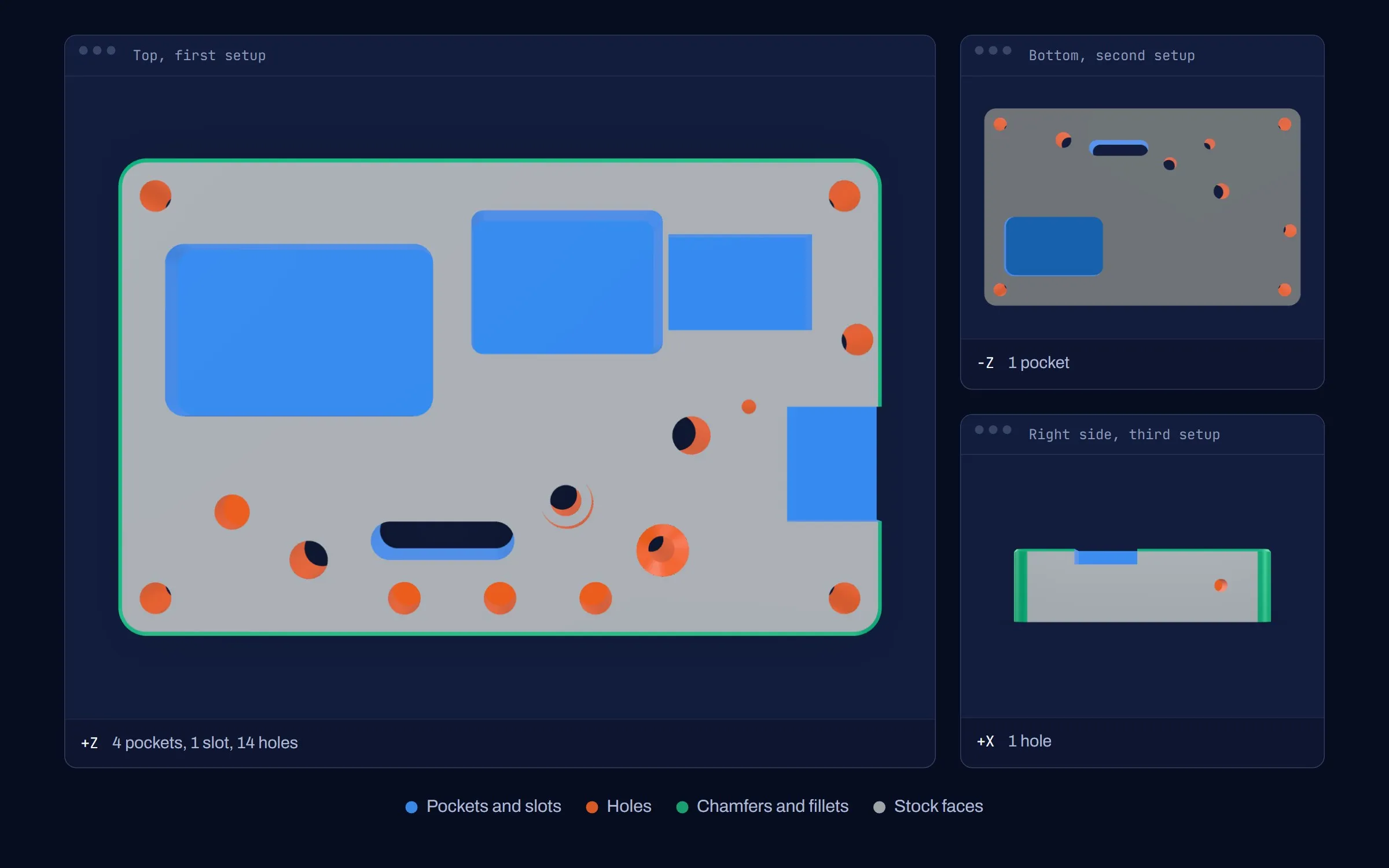
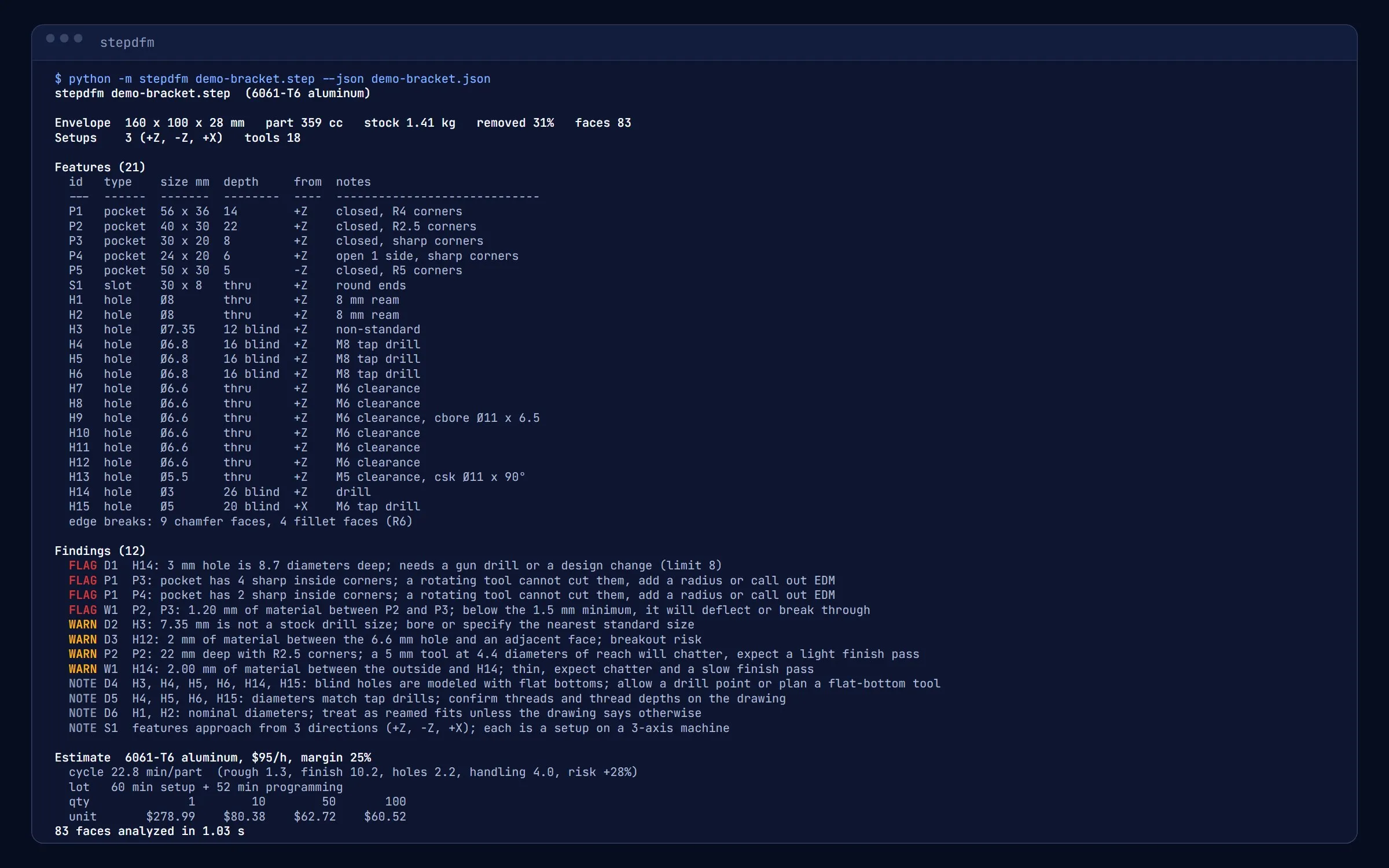
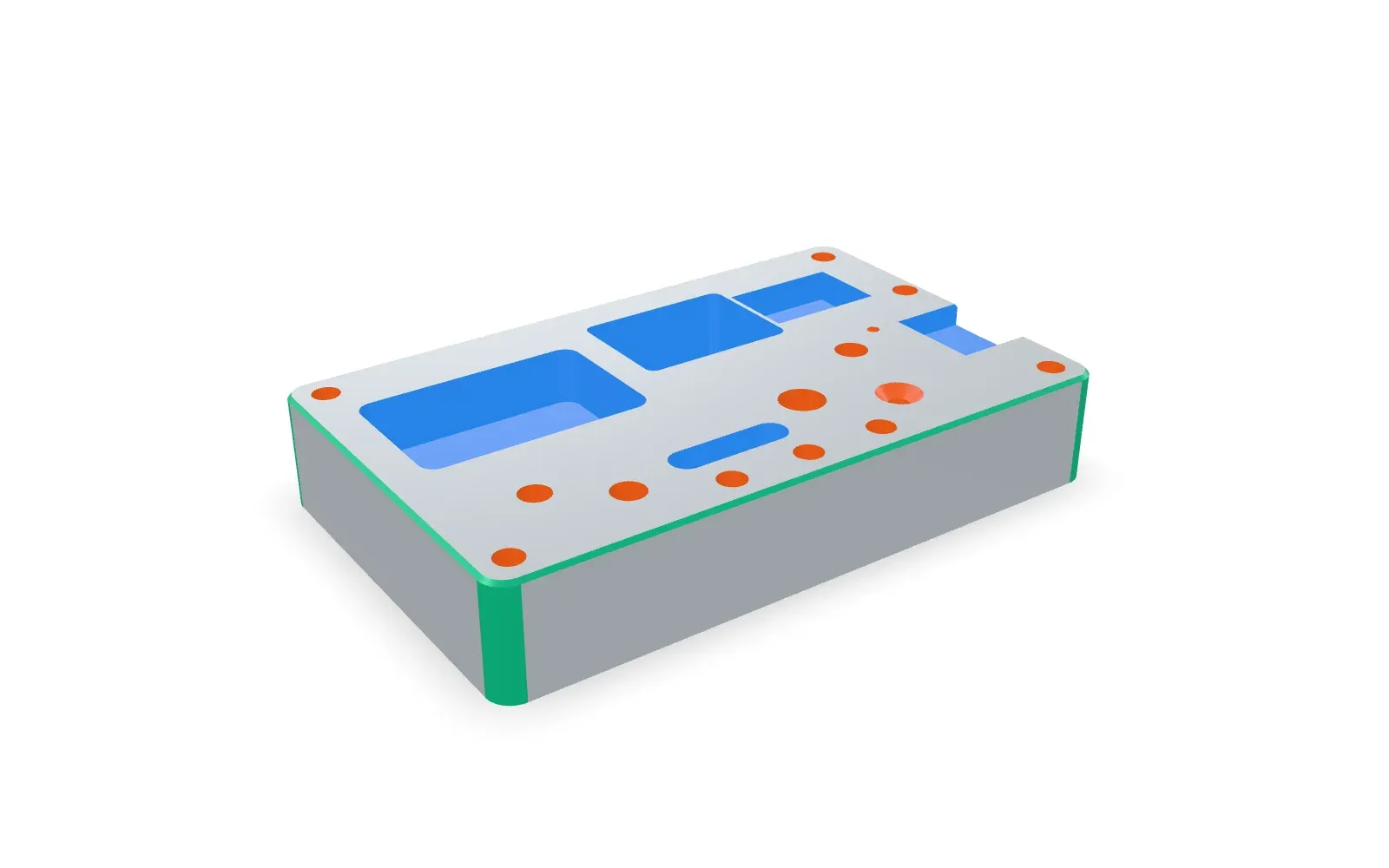
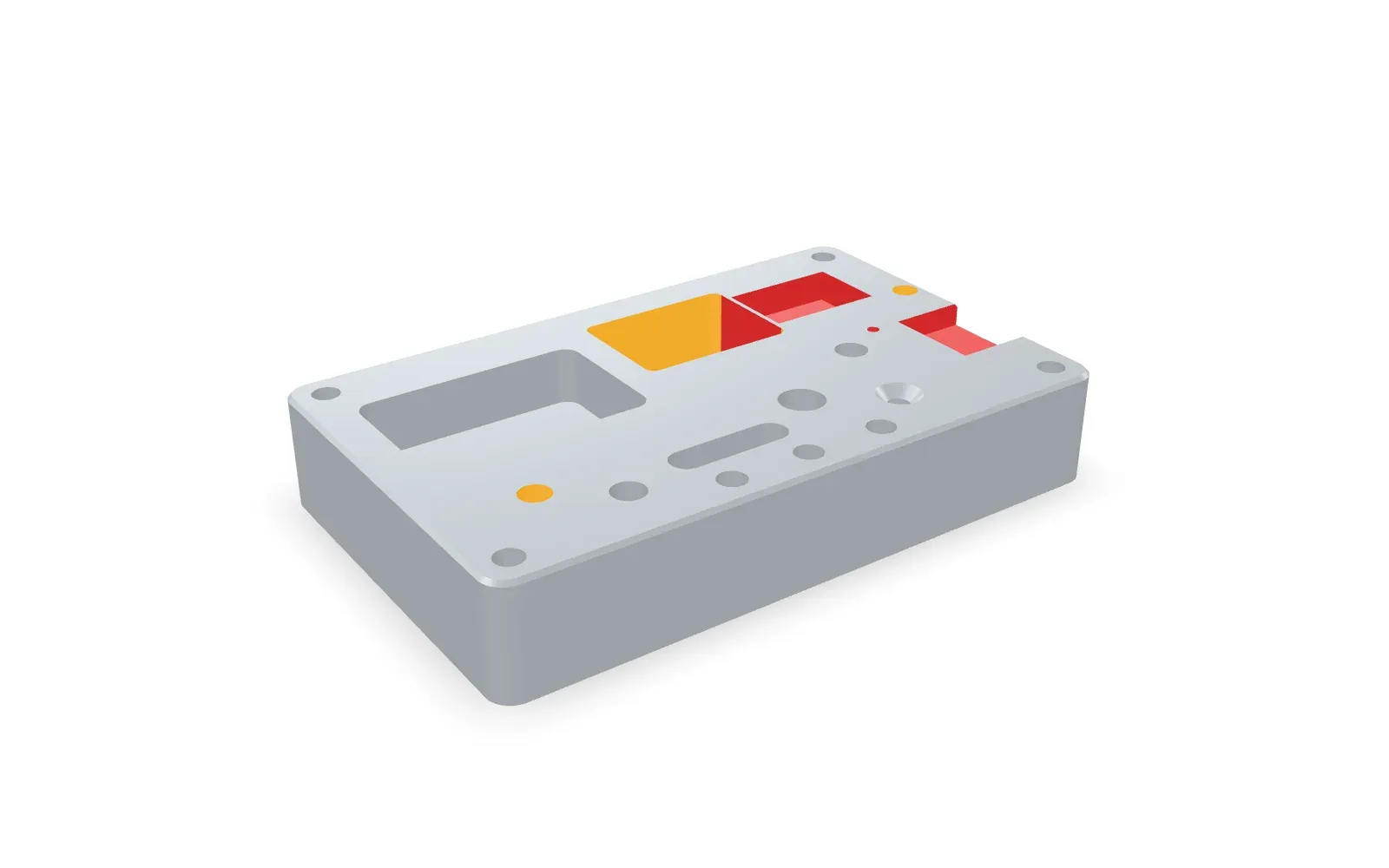
The demo block was modeled with a deliberate mix of good and bad practice: four pockets from the top and one from the bottom, a through slot, fifteen holes including a counterbore, a countersink, three tap drills, a hole in from the side, and a few traps. The report catches the 3 mm hole that is nine diameters deep, the two pockets with sharp inside corners, the 1.2 mm wall left between two pockets, the 7.35 mm hole that matches no stock drill, the clearance hole 2 mm from an edge, and the third setup. Nothing it reports is wrong, and nothing it should have caught is missing. Run on the locating plate from the fixture case study, it recovers exactly what that model contains: four pockets, two slots, six holes, one setup, no findings.
What it does not do, on purpose: it reads geometry, not tolerances, so the drawing still decides what gets reamed or ground; it assumes prismatic parts on a 3-axis machine; and the rates are illustrative. The estimate is a first pass for a quoter to correct, not a price to send.
Gallery
-
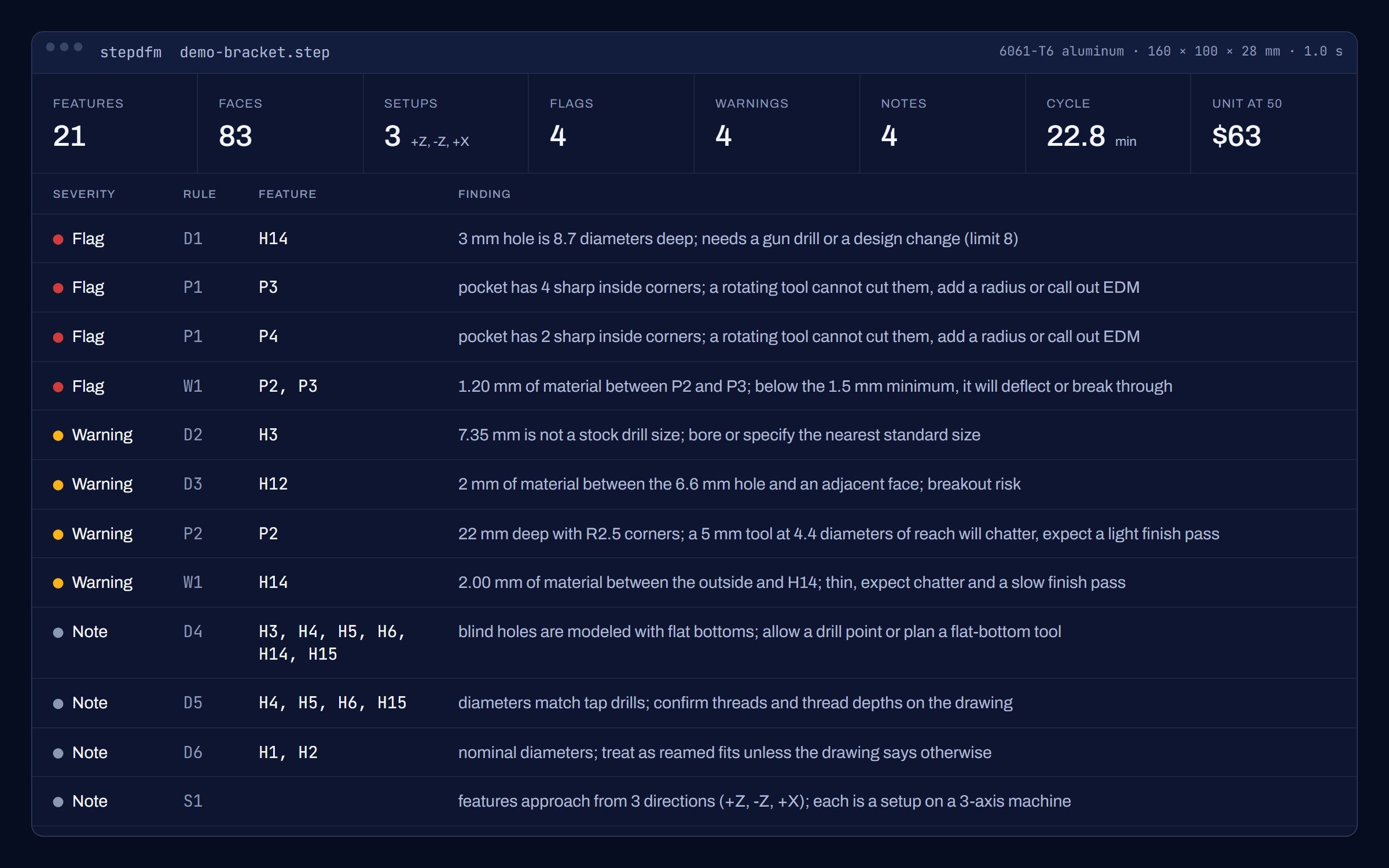
5.0 The report card. Every finding names a rule, the features involved, and what to do about it. Image -
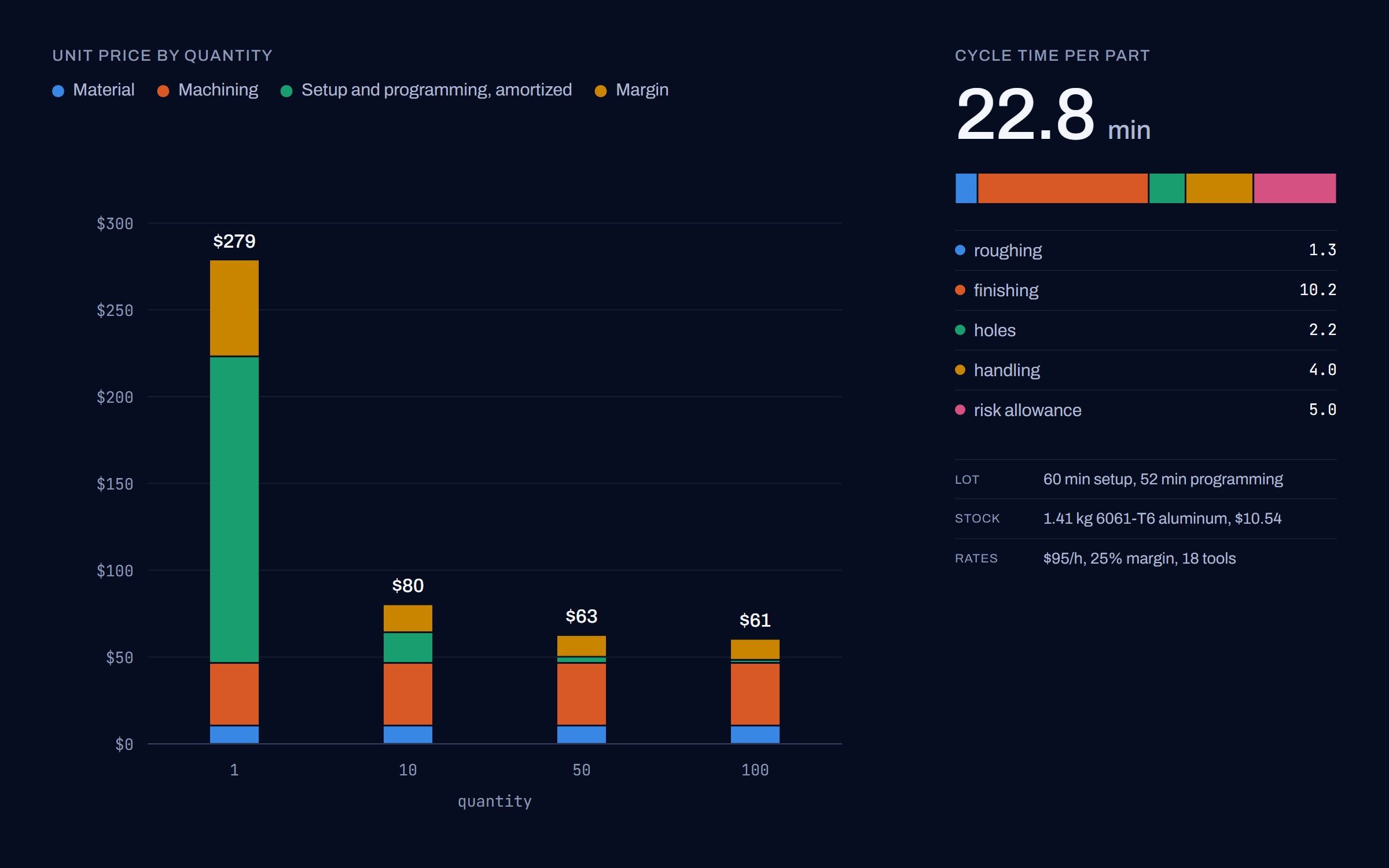
5.1 The estimate, split the way a quoter argues about it. Setup dominates at one piece; at fifty it is machining time. Image -
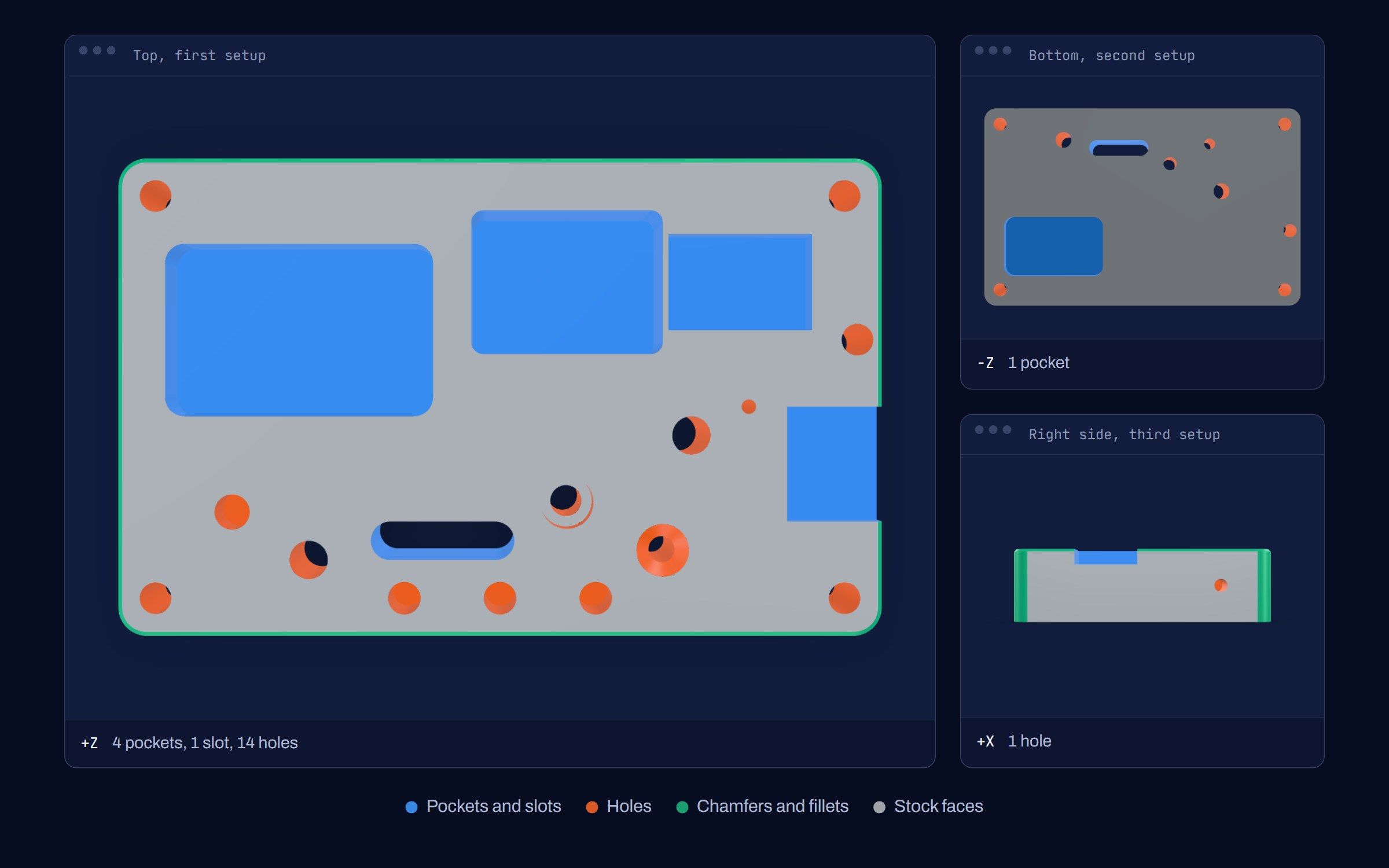
5.2 Three access directions, three setups. The tool counts them from the geometry, not from a note on the drawing. Image -
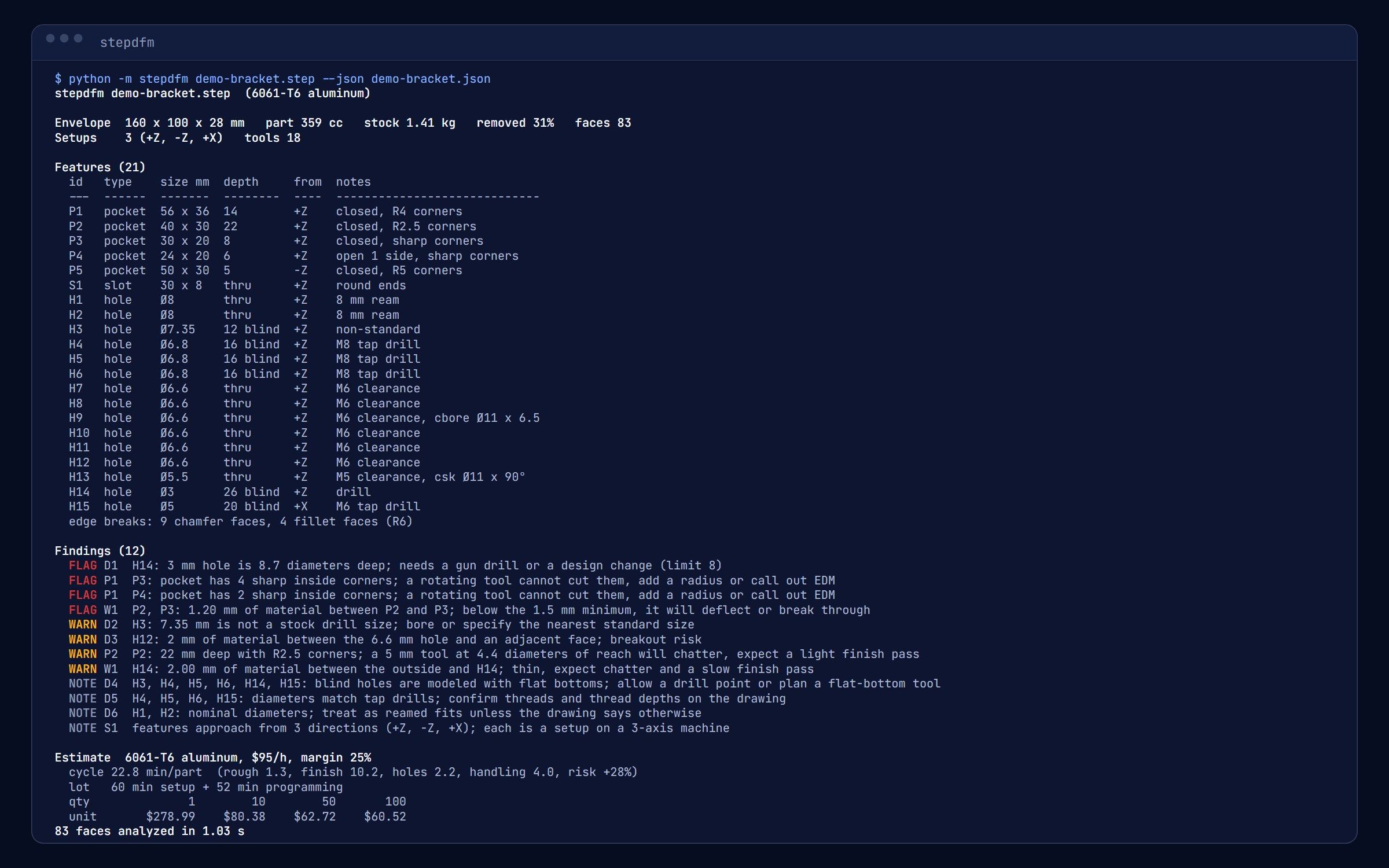
5.3 The plain-text report, which is what most of the shop reads. JSON and Markdown are one flag away. Image